The guide
The OSSBuy logbook: one parcel, eleven dated entries
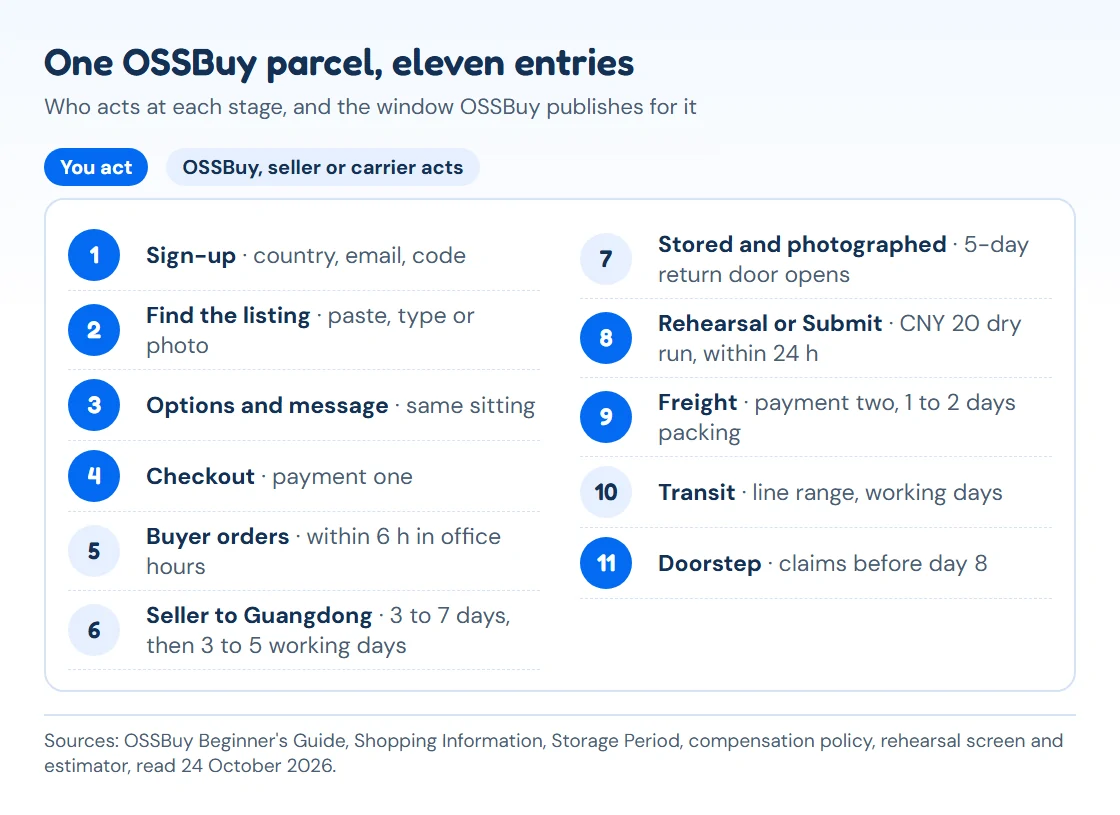
From the sign-up form to the unboxing video. Each entry gives the window OSSBuy publishes, what you see on screen, and the one decision that matters at that point.
Watch it first, then read the entries
OSSBuy put four videos on its own home page: a full tutorial and three short animated clips with its blue rabbit mascot, one per stage. They are embedded here unedited. Nothing loads from OSSBuy's server until you press play.
- Entry oneSign-up, one sitting
Sign-up hour: an account with the right country
- Six fields, two optional
- Invite field filled from a referral link
OSSBuy's register page wants your destination country, an email, the same password entered in two boxes, and a code it sends to that inbox. Below those sit two optional fields: a promo code and an invite code. If you arrive through a referral link (ours is marked as one) the invite field is already filled. OSSBuy's tutorial video adds Gmail and Apple ID sign-in to the email route.
Pick the country you will ship to. It is the first thing the checkout page uses to decide which lines and which payment options to show, and it is easier to set it right now than to discover a missing line at entry nine. Then set the display currency (the switch at the top of every page reads "English / USD" by default; OSSBuy's rate table had 21 currencies on 24 October 2026) and add your delivery address under Account Info.

Sign-up, as shown in OSSBuy's own tutorial video (frame at 31 s). Full account checklist: account setup. - Entry twoSame sitting
Finding the listing: pasted URL, typed keyword or camera
- Taobao, Weidian, 1688 links
- Keyword search: Taobao and 1688
There are three ways in. Paste a listing link from Taobao, Weidian or 1688 into the search bar; type a product name and browse what OSSBuy gathers from Taobao and 1688; or use the camera icon to search by photo. The guide says OSSBuy can read 99% of listings from those three platforms. For the rest it shows "Link not supported, please use Fill & Buy", which opens the DIY Order form.
Fill and Buy asks for the link, name, specification, a product photo, the price in yuan, the seller's domestic courier fee in yuan, the quantity and an optional remark. Its total line carries a reminder that international shipping is not included and will be worked out when you submit the parcel. Type the price carefully: if it is wrong, the buyer sets a supplementary payment for the difference.
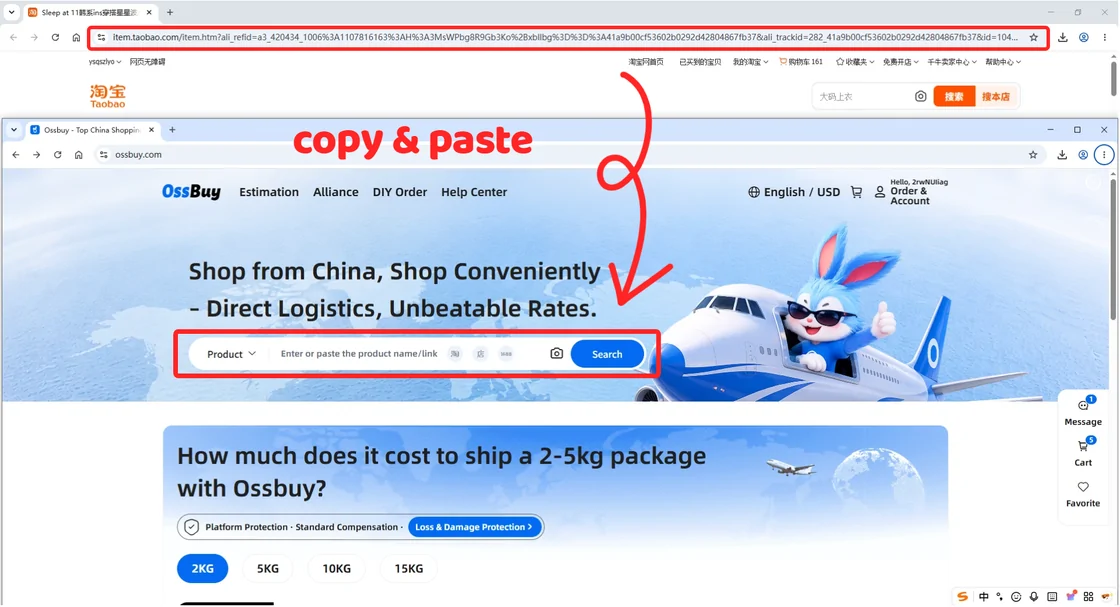
OSSBuy Beginner's Guide, step one, method one (official screenshot, 30 June 2026). - Entry threeSame sitting
Swatches, sizes and the Message field
- Message goes to the buyer
- Agreement box must be ticked
OSSBuy's product page repeats the seller's options: colour swatches, sizes, a quantity box and a Message field. Above them, a small route line reads Seller, then Warehouse, then Address, with the estimated international fee left blank until later. The Message field is the only place to tell the buyer something the options cannot say, for example "size 41 is the European label size, please confirm with the seller" or "please photograph the inside seam".
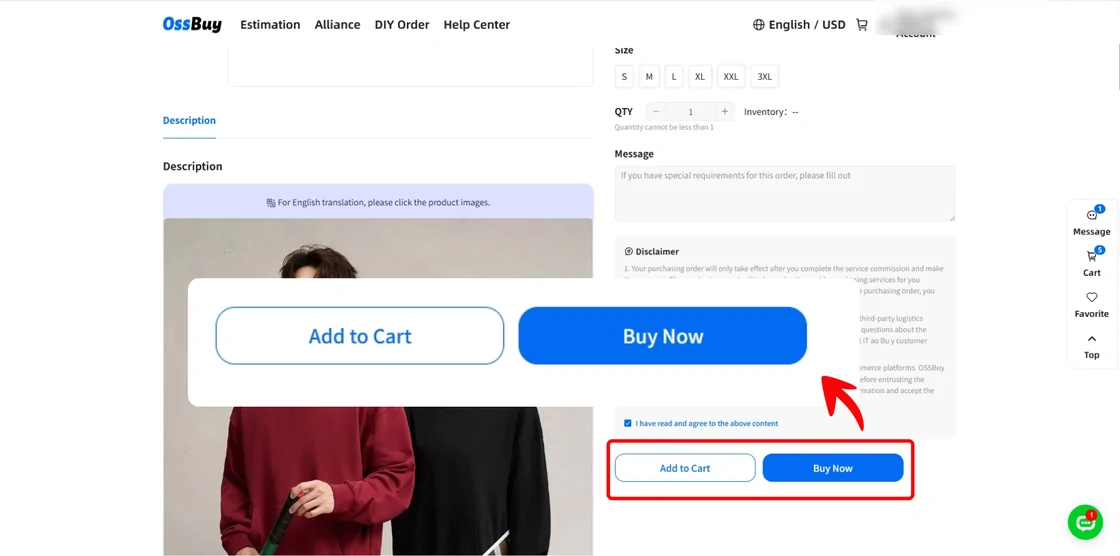
Beneath the two buttons sits a disclaimer, and neither button responds until you tick agreement to it. Its third point is worth reading once: product information comes from third-party platforms, and you accept the risk on quality and authenticity before you ask the agent to buy.
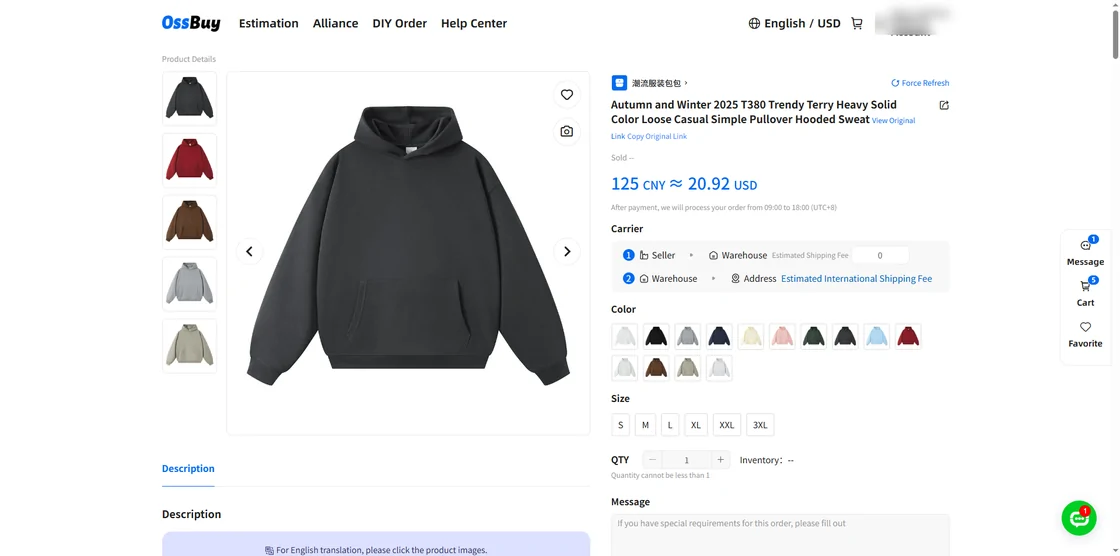
OSSBuy Beginner's Guide, step two: options and the Message field. The account name in the corner is blurred by us. - Entry fourSame sitting
Checkout: payment one buys goods and domestic postage
- First payment: goods and seller courier
- Several currencies at checkout
The confirm page shows the destination, the item list and a shop total split into goods and the seller's domestic shipping. It does not include international freight; that is the second payment. Tick the line that confirms you read the prohibited products declaration and the return policy, then press Submit Order.
The payment screen in OSSBuy's June 2026 guide offered account balance, PayPal, TradPay, card payment with the usual card networks, Google Pay and Skrill. Third-party payment providers set their own fees, which the Terms of Use leave to you, and the same Terms name the 10% technical service fee for order payments. Read the final figure on that screen before you confirm.
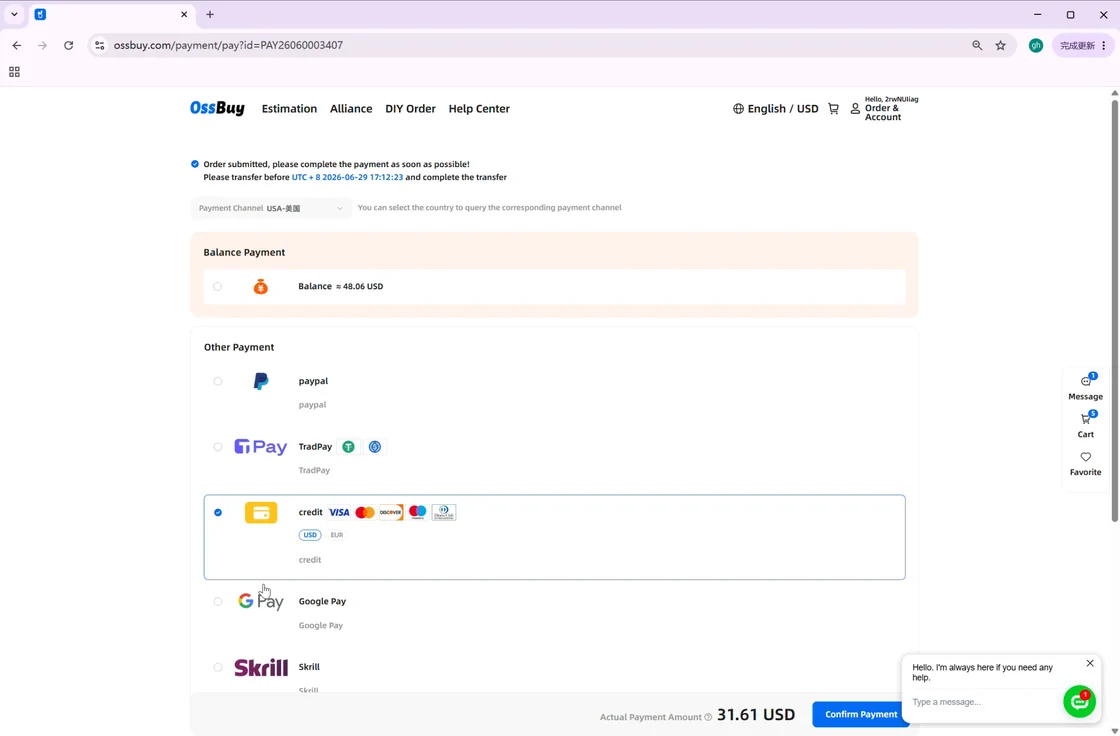
OSSBuy Beginner's Guide, step three: payment methods. The order number and amount are OSSBuy's own example values. - Entry fiveWithin hours
The buyer's shift in Beijing office hours
- Paid 09:00 to 18:00 Beijing: answer within 6 h
- Paid later: by 14:00 next day
An OSSBuy buyer now places the order with the seller. The service table in OSSBuy's shopping information sets the pace: pay inside the Beijing working window of 09:00 to 18:00 and a buyer replies within six hours; pay in the evening or at night and the reply comes by 14:00 the following day. The order page itself mentions an "Express Response" service that promises processing within one hour of submission.
The order card moves through In Process, Purchased, Shipped, Arrived and In Storage. Use the Contact button on the order for questions. When a seller says the item has sold out, you get 72 hours to reply before the buyer cancels it on your behalf; if the price changed, you get a supplementary payment request instead of a silent cancellation.
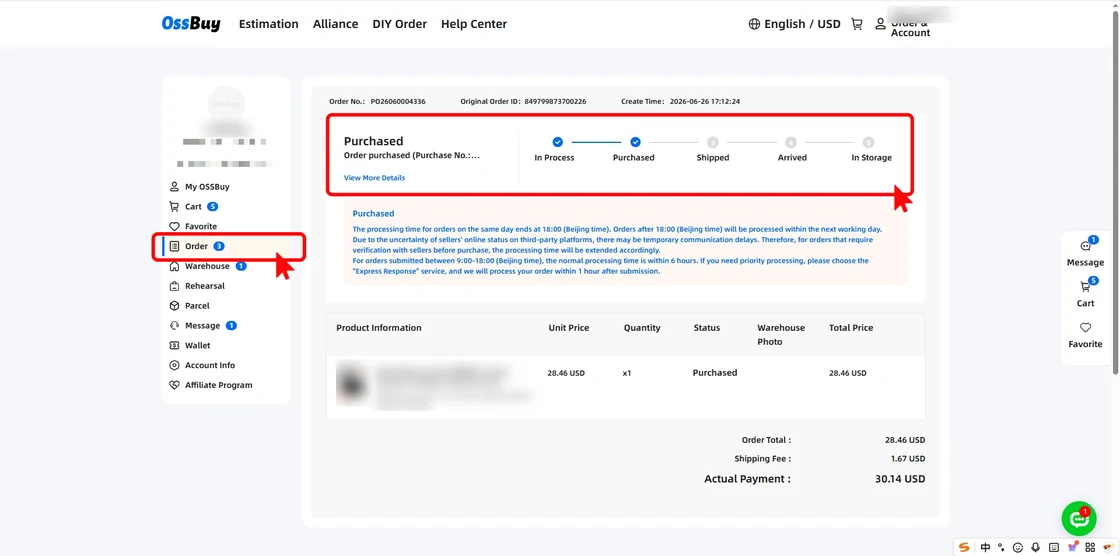
Order detail with the five-stage progress bar. Official screenshot; the product title, photo and account name are blurred by us. - Entry sixDays three to ten or so
Seller to Guangdong: the quiet stretch
- Seller dispatch: 3 to 7 days is normal
- Courier to Guangdong: 3 to 5 working days
This is the stage where nothing seems to happen. Chinese sellers generally ship within three to seven days. If a seller has not shipped after three days, OSSBuy's buyer follows up on day four and every three to four days after that; a seller who never answers is the point where the buyer suggests cancelling. Pre-sale and deposit items are outside that rule and can take much longer.
Once shipped, a domestic parcel normally reaches the warehouse in Guangdong within three to five working days. If tracking shows a parcel shipped more than three days ago but still not signed for, the buyer checks the courier within 48 hours. You can also press the button that urges delivery; OSSBuy says it verifies the seller's timing within 24 hours.
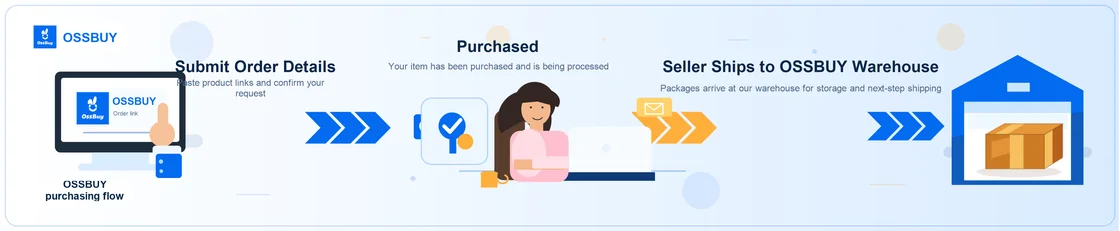
OSSBuy's drawing of entries four to six, from its Beginner's Guide (30 June 2026). - Entry sevenDay of arrival
Stored and photographed: the five-day door
- Photos: 3 to 6 fixed angles
- Return door: 5 days
- Free storage: 90 days
When the item is signed in, staff open it, check quantity, colour and size, and photograph it. OSSBuy's order screens describe the standard set as three to six fixed-angle shots. The Warehouse list shows storage time, weight and volume, the photos, and an Operation menu with Return/Exchange (with a countdown), Custom Photo, Extend Storage and Tip.
Two clocks start here. You have five days from the moment the item shows as stored to request a return or swap without giving a reason, at CNY 5 per order plus postage both ways. And free storage runs for 90 days. Look at the photos the day they arrive: the countdown on the Return/Exchange button is measured in hours.
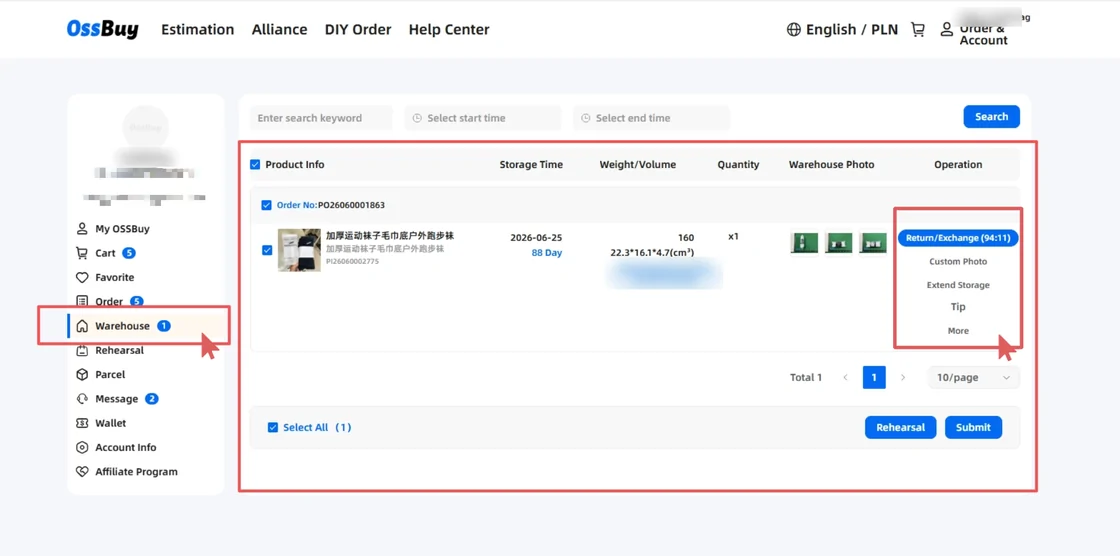
The Warehouse list with photos and the Return/Exchange countdown. Official screenshot; a category label and the account name are blurred by us. How to judge the photos: warehouse photos.
- Entry eightWhen the last item is in
Rehearsal or straight to Submit
- Rehearsal: CNY 20, done within 24 h
- Or select and Submit
When everything you want in this parcel is stored, tick the items and choose. Rehearsal is a measured dry run: for CNY 20 the warehouse packs the selection, weighs and measures it, and puts the items back. It is processed within 24 hours, OSSBuy grants a small number of free rehearsals each month, and it does not ship anything; you still have to submit afterwards.
Submit goes straight to the shipping form: address, line, packing method and extras. The packing options include removing all original packaging (box and outer bag go, and cannot be recovered), reinforcement and insurance. Removing boxes cuts volume weight but also cuts what the after-sales team can verify later, a trade-off the confirm dialog spells out.
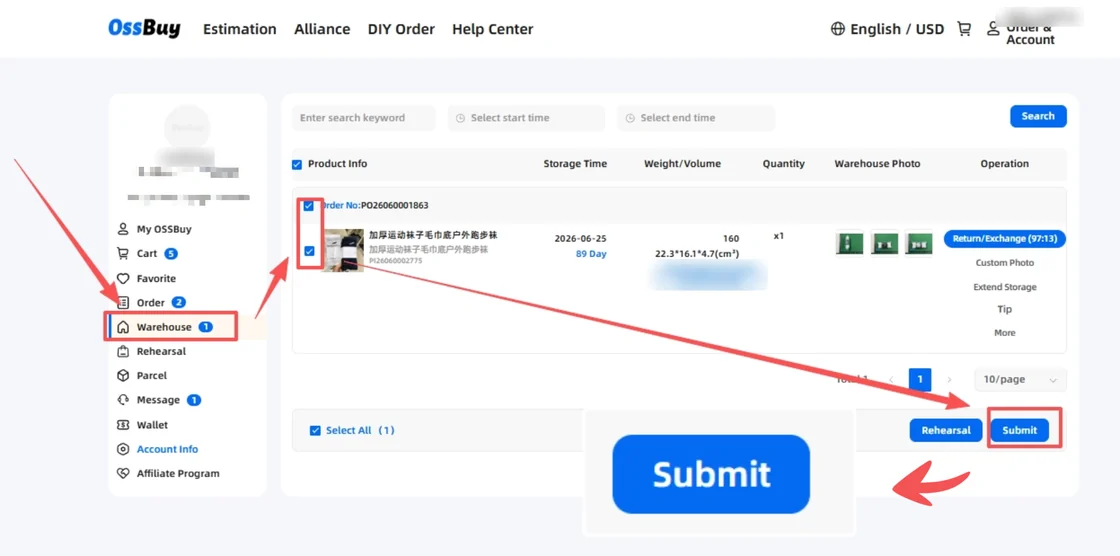
Select, then Rehearsal or Submit. Official screenshot; a category label and the account name are blurred by us. - Entry nineOne to two days of packing
Second payment: the international leg
- Second payment: freight
- Half-price shipping offer to 31 Dec 2026
You pay freight when you submit. The Terms of Use call that amount an estimate: after the warehouse packs and weighs the box, any shortfall is taken from your account balance and any overpayment goes back to it. The 10% technical service fee is named for this payment too. Packing then takes the warehouse one to two days.
A half-price shipping offer was running when we checked (the home page pop-up gives 18 May to 31 December 2026), and the estimator applied it to the weight charge but not to the CNY 8 or CNY 24 handling charge. Our planner shows both the list and the discounted figure so you are not caught out if the offer ends while your parcel is still in storage.
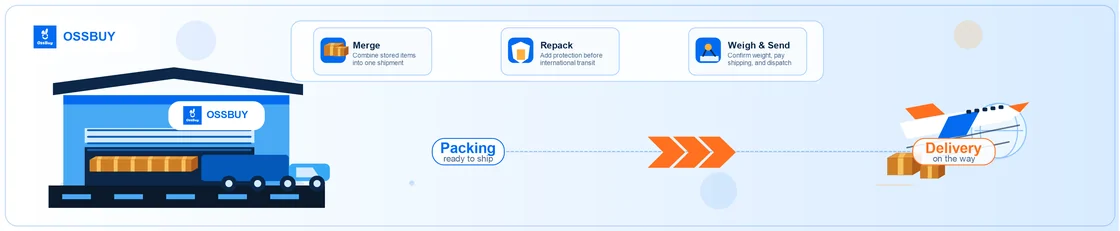
OSSBuy's drawing of the shipping half: merge, repack, weigh and send (Beginner's Guide, 30 June 2026). - Entry tenOne to three weeks
In the air or on the road: tracking under Parcel
- US line quoted 10 to 13 working days
- EU DHL lines quoted 7 to 20
After dispatch the parcel appears under Parcel with its tracking. Transit times depend on the line: on 24 October 2026 the estimator quoted 10 to 13 working days for the USA dedicated line, 7 to 15 for the UK line and between 7 and 20 for the self-operated DHL lines into Europe. The help centre's own table gives slightly different ranges, so treat both as guides.
Chinese holidays add days before the parcel even leaves. OSSBuy's 2026 notices paused shipping over Qingming, May Day, the Dragon Boat Festival and National Day, with customer service still answering. Customs inspections and failed delivery attempts are not counted as delays in the compensation rules.
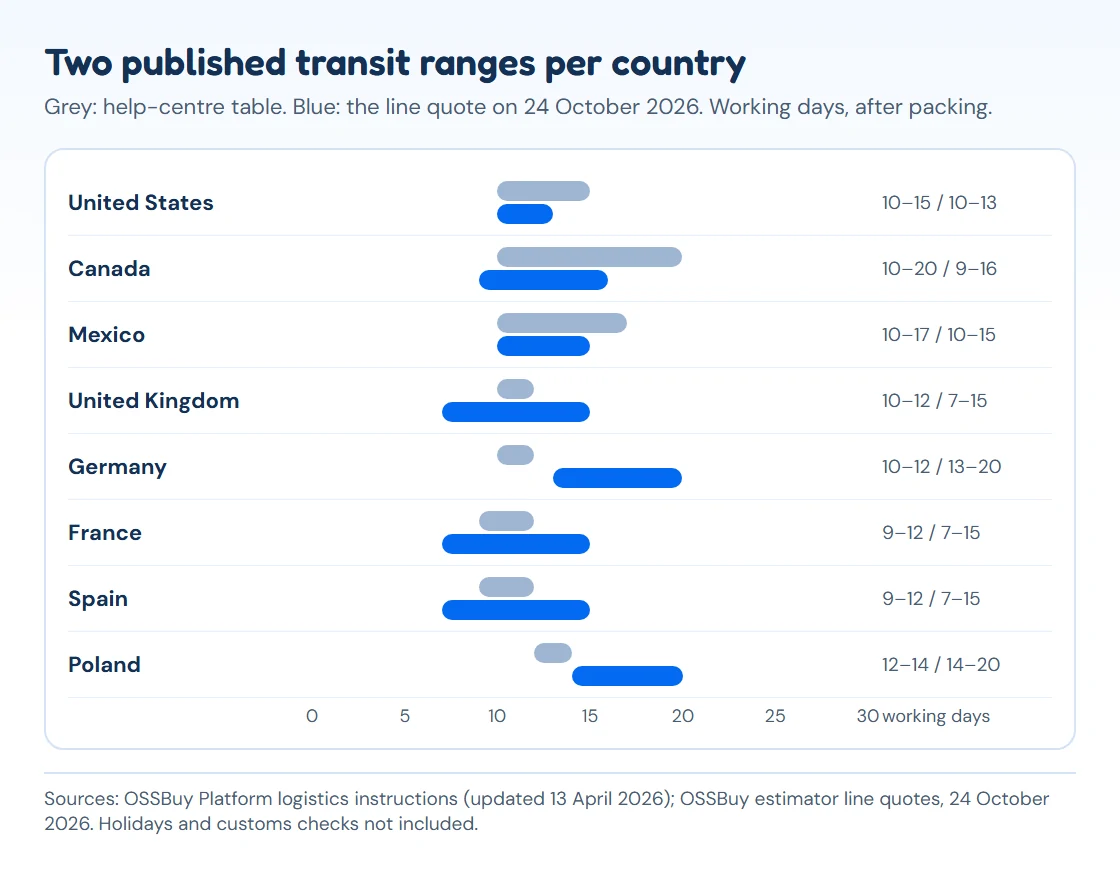
Transit ranges in working days: the help-centre table against the estimator's line quotes on 24 October 2026. Drawing by this site. - Entry elevenDelivery day plus seven
Doorstep: confirm, open on camera, claim inside a week
- Confirm under Parcel
- Damage or shortage: before day 8
Before you cut the tape, start recording. OSSBuy's compensation policy asks for one unedited video that shows the shipping label on the unopened parcel, the whole unboxing and the PI number under each item's barcode, plus a clip of any damage. Claims for shortage or damage are refused from the eighth day after delivery.
Then confirm receipt under Parcel. If you bought insurance, the parcel page has a File a Claim button in the Worry-Free Shipping section; without insurance, claims go through online customer service with the same evidence. The full rules, including what the uninsured tables pay, are on returns and claims.
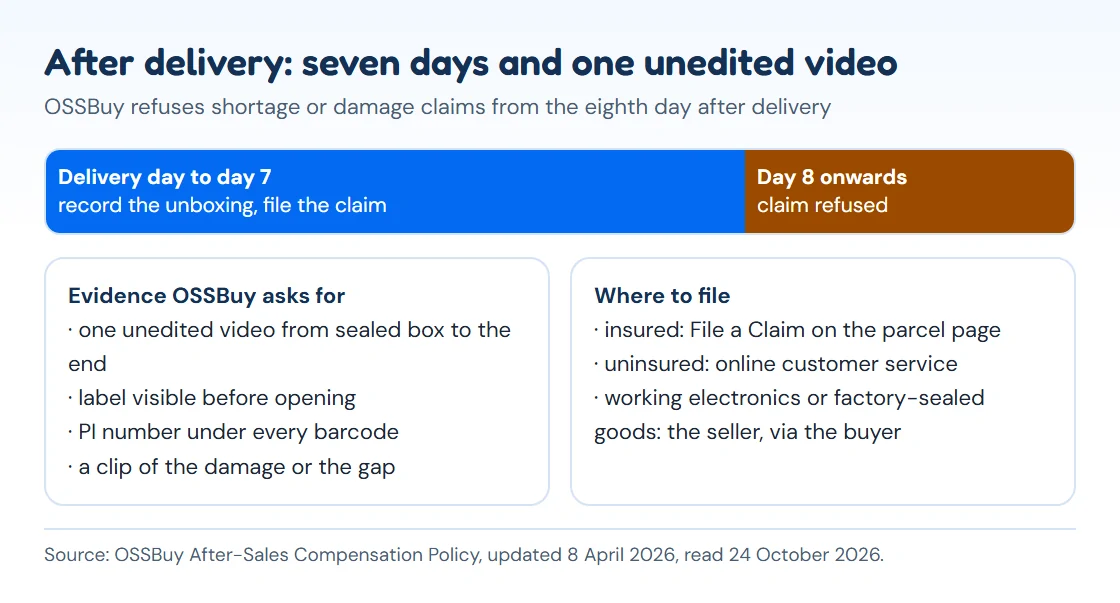
The claim window and the evidence list from OSSBuy's After-Sales Compensation Policy (updated 8 April 2026). Drawing by this site.
Outside the logbook's scope: forwarding, points, tips
It does not cover forwarding (sending your own parcels to the OSSBuy warehouse with a tracking number) because a first parcel is easier to learn through the buying route. It also skips the affiliate programme and the points and tipping features, which do not change how a parcel moves.
Two entries have no official screenshot yet: tracking under Parcel, and the confirm-and-claim screen. For those two the text stands on OSSBuy's written rules, with our own diagrams of the transit ranges and the claim window.